html xmlns="http://www.w3.org/1999/xhtml" xml:lang="en" lang="en"> MaNGOS Kobold: October 2006

Tuesday, October 31, 2006

Guide to Set Up a Private (singleplayer) Kobold Server (Part 2)

Step 5)
Use account manager to make id (download from Here)
and setting see.


Level player 0 = narmal 1-3 = admin


make Account ok, Let'go Config Kobold

STEP 6)
Go to the kobold root folder and then into the folder called LS,RS,WS and then into the folder called conf

Open the file first config file called login_server.conf and edit the values as follows:

Code:

LoginServerListenIp = #change this to your server's LAN ip address

LoginServerPort = 3724

DefaultRealmName = Kobold Test Realm # leave it as is or change it to whatever you want to call your realm

DefaultRealmAddr = # again change to your servers LAN ip address

DefaultRealmPort = 3725

DefaultRealmType = "Normal"

Save the file and then open the sql.conf and edit as follows:

Code:

DatabaseName = kobold

DatabaseHost = localhost

DatabasePort = 3306

DatabaseUser = your database root id

DatabasePassword = your database password your database server's root password


save the file and then go back to the root kobold folder

You must to perform the above steps two the conf files in RS folder And WS


Friday, October 27, 2006

Guide to Set Up a Private (singleplayer) Kobold Server (Part 1)

Step 1)
Download the latest version of Kobold (use Google) *_*

Step 2)
UnRar or Install to folder an easy to access directory. (etc C:\)

Step 3)
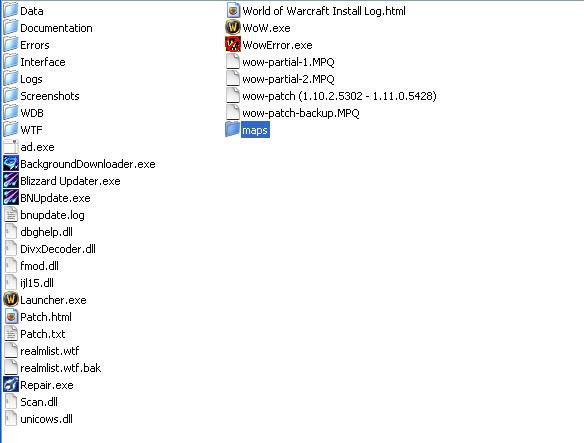
Set up the server....Ok let' go to hard part. Please see picture and follow my manual.
Make sure you are using client 1.12.1 (the latest version of \/\/@\/\/)
Go to the Kobold root folder and into the folder labeled Tools
Copy the file MapExtractor.exe into your \/\/@\/\/ client folder
Go to your client folder and create a new folder in there called maps
double-click MapExtractor.exe and wait for it to finish extracting the maps
When finished, move the maps folder into your Kobold server's root (where the readme.txt file is)


Go into the Tools folder again and double-click the file named DBCextractor.exe - when prompted extract the contents into the \KoboldServerLite\WS\ folder in the Kobold server directory
go to the above folder and edit the file ExtractDBC.bat
Modify the line set WoWdir=r\Data\ to point to your client's data foler
Save the file and then double-click to run it, make sure there are no errors


Step 4)
Create Database Call "kobold" (Make sure the database format is utf-8) by Navicat


go to Navicat and select database call Kobold
right click database and select Execute batch file


locate a sql file and run it. Make sure is no errors


Kobold Gm Commands

.help = HELP [cmd] - Use .COMMANDS (or .COM) to list available commands.\nUse .HELP XXX to get help on command XXX, also you can use .HELP XXX YYY to get help on complex command.\nConsole also accepts short versions of commands.
.acct = ACCT - Shows your current access level.
.anim = ANIM animId - Your character does emote 'animId'.
.announce = ANNOUNCE text - Broadcast worldwide message to all players. Also command known as BROADCAST.
.broadcast = BROADCAST text - Broadcast worldwide message to all players. Also command known as ANNOUNCE.
.goname = GONAME name - Teleports yourself to named player location.
.namego = NAMEGO - Summons named player to your location.
.aura = AURA auraId - Gives yourself the auraId aura.
.commands = COMMANDS - Display all available commands for your access level.
.commands_after = Subcommands grouped by color and brackets. Use |cffccccff.help cmd|r, or |cffccccff.help cmd subcmd|r to read short command descriptions.
.version = VERSION - Print server version.
.suicide = SUICIDE - You commit suicide.
.revive = REVIVE - Instantly resurrect targeted player, if you are dead and can't chat use whisper to any target, like "/w 1 .revive"
.control = CONTROL - Toggles control on/off, if toggled on the selected creature or player is under your control
.dismount = DISMOUNT - Dismounts you and restores your movement speeds to normal (not for normal players).
.gmlist = GMLIST - Shows list of all online GM on the server.
.gmon = GMON - Modifies your player flags to become GM player.
.gmoff = GMOFF - Restores your player flags back to non-GM player.
.where = WHERE - Shows location in the world for selected NPC, player or yourself (if nothing selected).
.sinfo = SINFO - Shows brief information on server status (connected players).
.invis = INVIS - !Untested! toggles your invisibility for other people.
.itemmove = ITEMMOVE s1 s2 - Swaps two slots in your inventory.
.kick = KICK name - Forces named player to disconnect.
.modify = MODIFY - used to modify some stats and values of selected player. Also works as ".MOD" command. Available options are:
.morph = MORPH - Changes your display model to anything. NOT REVERSIBLE unless you know your old model id!
.mount = MOUNT - Mounts yourself on specified mount, use DISMOUNT to get off.
.addgo = ADDGO go_id - Creates gameobject go_id at your location. Use <.addgo NN> to test, and <.addgo NN save> to create and save in DB.
.delgo = DELGO go_id dist - Deletes gameobject nn around you inside radius (deletes also from DB). Distance defaults to 5 units.
.delgoinloc = DELGOINLOC dist - Deletes all gameobjects around you inside radius (deletes also from DB). Distance defaults to 5 units.
.saygoinloc = SAYGOINLOC dist - Sowns the list of found GO (name + id ) at specified distance .
.recall = RECALL loc_name - Quick jump to known world locations - sunr, thun, cross, ogri, neth, thel, storm, iron, under, darn.
.weather = WEATHER zone_id weather_name - Sets the weather in the specified zone to one of the following possibilities - sun, fog, rain, snow, storm.
.save = SAVE - Saves current player now.
.security = SECURITY name accessLvl - Change GM access level of named player in database.
.standstate = STANDSTATE st - Sets your own standstate to nn.
.hearth = HEARTH - Teleport yourself to hearth bind location (player start or the inn).
.taxicheat = TAXICHEAT 1/0 - Opens/Closes all flight locations for selected player.
.go = GO x y z - Moves yourself inside current world map.
.worldgo = WORLDGO map_id x y z - Moves yourself to specified map_id and xyz coordinates.
.goguid = GOGUID guid - Teleports yourself to location of object with specified GUID.
.addgrave = ADDGRAVE - Adds new graveyard at your location (should not be used!)
.createguild = CREATEGUILD leader name - GM command to create guild without signing petition.
.wp = WP... - Allows access to waypoints control commands. Available commands are:
.wp add = WP ADD [N] - Add waypoint for selected NPC at your location. If you type .WP ADD N - then waypoint will be inserted at position N, shifting waypoints after it forward.
.wp add0 = WP ADD0 [N] - Same as WP ADD but also sets Wait = 0.
.wp info = WP INFO - Displays brief information about current waypoint.
.wp show = WP SHOW - Shows all waypoints for selected NPC, indicators for previous NPC are hidden.
.wp hide = WP HIDE - Hides waypoint indicators.
.wp come = WP COME - Moves selected waypoint to player location (synonim - WP MOVE).
.wp move = WP COME - Moves selected waypoint to player location (synonim - WP COME).
.wp delete = WP DELETE - Deletes one selected waypoint.
.wp clear = WP CLEAR - Deletes all waypoints for NPC. You can target any waypoint too, to clear this NPC path.
.wp wait = WP WAIT n [m] - Sets wait times for selected waypoint, can be used as .WP WAIT N - for wait always for N, and as .WP WAIT N M - for random wait time between N and M. Values 0-255.

.npc = NPC... - Allows access to NPC control commands. Available commands are:
.npc add = NPC ADD npcId - Spawns new NPC at player position using NPC template with given npcId.
.npc level = NPC LEVEL nn - Sets level for selected NPC.
.npc mtype = NPC MTYPE nn - Choose movement type for NPC: 0 - random roam, 1 and 2 - walking along the path forth and back, 3 - looping over the path forth, 4 - looping back.
.npc turn = NPC TURN - Turns NPC facing to you and remembers this angle until spawn time or when mob returns to original location.
.npc come = NPC COME - Sets NPC spawn point to player position and orientation (synonim - NPC MOVE).
.npc move = NPC MOVE - Sets NPC spawn point to player position and orientation (synonim - NPC COME).
.npc sell = NPC SELL item_id - Adds item by id to selected vendor sell list.
.npc delete = NPC DELETE - Deletes selected NPC and his waypoints from the world.
.npc model = NPC MODEL model_id - Changes display model for selected NPC (permanent for this spawn only).
.npc faction = NPC FACTION action_id - Changes faction template for selected NPC (permanent for this spawn only).
.npc flags = NPC FLAGS f - Changes NPC flags for selected NPC.
.npc size = NPC SIZE k - Changes size of selected NPC.
.npc info = NPC INFO - Displays brief info for selected NPC.
.npc listhate = NPC LISTHATE - Briefly shows hate list contents for NPC.
.npc run = NPC RUN 1/0 - Sets run/walk mode for selected NPC.
.npc guid = NPC GUID - Displays GUID of selected NPC.
.npc sptime = NPC SPTIME t [t2] - Allows changing spawntime for selected mob. Requires 1 or 2 numbers (seconds). 2 numbers represent random wait time in range between t and t2 seconds.
.npc spdist = NPC SPDIST r - Allows changing roam radius for selected mob. Requires 1 parameter expressed in game units (metres).
.npc kill = NPC KILL - Makes targeted NPC die (deals damage equaling his maxhealth). Spawn point is not deleted.
.npc respawn = NPC RESPAWN - Makes targeted NPC or corpse of NPC instantly respawn once.
.npc freeze = NPC FREEZE 1/0 - Freezes or frees selected NPC.
.npc freezecell = NPC FREEZECELL 1/0 - Freezes or frees all NPCs in your current Cell.

.import = IMPORT... - Allows access to data importing commands.
.import gameobj = IMPORT GAMEOBJ - Imports text file named world_gameobj.txt containing list of gameobjects. Make sure that you cleared Gameobjects table.
.import world = IMPORT WORLD - Imports text file named world_spawns.txt containing list of creature spawns. Make sure that you cleared Creatures and Creatures_mov tables.
.debug = DEBUG... - Access to developer commands, that possibly can ruin, or do not affect normal gameplay. Available commands are:
.debug test = DEBUG TEST - Test command.
.debug flags = DEBUG FLAGS nn - Sets FLAGS update field of selected NPC to nn.
.debug pflags = DEBUG PFLAGS nn - Sets FLAGS update field of selected player to nn.
.debug gtmst = DEBUG GTMST nn - Sets guild timestamp of selected player to nn.
.debug dynamicflags = DEBUG DYNAMICFLAGS nn - Sets DYNAMICFLAGS update field of selected NPC to nn.
.debug bytes0 = DEBUG BYTES0 nn - Sets BYTES0 update field of selected NPC to nn.
.debug bytes1 = DEBUG BYTES1 nn - Sets BYTES1 update field of selected NPC to nn.
.debug bytes2 = DEBUG BYTES2 nn - Sets BYTES2 update field of selected NPC to nn.
.debug qinv = DEBUG QINV nn - Send message 'quest nn invalid'.
.debug qinv = DEBUG QFAILED nn - Send message 'quest nn failed'.
.debug location = DEBUG LOCATION - Shows your location on Map.
.debug mailerr = DEBUG MAILERR nn - Sends to client Mail Error message with code nn.
.debug grouperr = DEBUG GROUPERR nn - Sends to client Group Error message with code nn.
.debug spellerr = DEBUG SPELLERR nn - Sends to client Spell Error message with code nn.
.debug time = DEBUG TIME - Displays actual server time.
.debug inverr = DEBUG INVERR nn - Sends to client Inventory Error message with code nn.
.debug trainerr = DEBUG TRAINERR nn - Sends to client Trainer Error message with code nn.
.debug reload = DEBUG RELOAD - Reloads all Python scripts attached to server.
.debug transports = DEBUG TRANSPORTS - Spawns transports on server.
.debug water = DEBUG WATER n - Sets water level for player, making him swim.
.debug astate = DEBUG ASTATE n - Attacker State Packet Debugging. Select any Unit* before executing command (it will be your Attacker).
.debug stone = DEBUG STONE V1 V2 - (dev only).

.modify item = MODIFY ITEM idem_id [count = 1] - Puts item to player's inventory.
.modify mana = MODIFY MANA now_mana max_mana - Change player's mana and max_mana, works even if player had no mana before, now he has, and can learn casting spells.
.modify hp = MODIFY HP now_hp max_hp - Change player's health points and max_hp.
.modify health = MODIFY HEALTH now_hp max_hp - Change player's health points and max_hp.
.modify energy = MODIFY ENERGY now_en max_en - Adds some energy to player's energy points or take coins if coppers number is negative.
.modify rage = MODIFY RAGE now_rage max_rage - Adds some rage to player's rage points or take it if coppers number is negative.
.modify money = MODIFY HEALTH now_hp max_hp - Change player's health points and max_hp.
.modify gold = MODIFY GOLD coppers - Adds some coin to player's inventory or takes coins if coppers number is negative (synonim - MODIFY GOLD).
.modify level = MODIFY LEVEL new_lvl - Changes player level to new_lvl, adding required combo points and level up bonuses.
.modify speed = MODIFY SPEED f - Temporarily changes player run speed.
.modify swim = MODIFY SWIM f - Temporarily changes player swim speed.
.modify size = MODIFY SIZE - Temporarily changes player's size.
.modify mount n = MODIFY MOUNT 1..48 - Gives a mount to player.
.modify spell = MODIFY SPELL id - Teaches selected player a spell id (set 'id' negative to forget spell).
.modify skill = MODIFY SKILL id [level = 1 [maxlevel = 300]] - Teaches selected player a skill (set 'id' negative to remove skill).
.modify xp = MODIFY XP - Adds XP to player within current level, leveling him not more than once.
.modify qitems = MODIFY QITEMS - Adds items to selected player, that are required by quest.
.modify qkill = MODIFY QKILL - Adds fake kills to complete quest objectives.

.special = SPECIAL... - Access to special GM commands modifying status of selected character. Available commands are:
.special disable_selection = GM DISABLE_SELECTION - Disables selected character and forces it to log out (Ghost screen in Characters Tab).
.special disable_name = GM DISABLE_NAME - Disables selected by name character and forces it to log out (Ghost screen in Characters Tab).
.special force_rename = GM FORCE_RENAME - Disables selected character to rename and forces it to log out (Name change request in Characters Tab).

Thank for Niakin

MaNGOS VS KOBOLD

3 day I try Kobold and compare with MaNGOS, I just to tall aboue them of my opinion

1. MaNGOS
1.1 Good
1. many update Quest, data and scripts
2. Good communities forum
3. Good Database (Credit Silver Database Forum)
4. Use spec and memory less
5. Config Easy than Kobold
6. It an Opensource
1.2 Bad
1. Not for made private online
2. Core not complete and release
3. Still not complete and more..

2. Kobold
2.1 Good
1. Core file so good nearly complete than MaNGOS
2. Good forum help and mod
3. support to make public server than MaNGOS
2.2 Bad
1. Use high memory and cpu than MaNGOS (In my pc MaNGOS use ram less 512 mb but Kobold use high than 1000 mb)
2. Source is close
3. Database not good than MaNGOS (etc. Quest)

Tuesday, October 24, 2006

Pics MaNGOS works fine

If you good config you just see this

HOW TO USE OLD AD.EXE T EXTRACT 1.12.1 MAPS

1. rename patch-2.mpq to "patch-2.mpqx"
2. rename terrain.mpq to "patch-2.mpq"
3. make a "maps" folder
4. run old ad.exe

Let see.


...
...
...
Wait untill progress finish
Now maps is ready to use.... ^_^

Monday, October 23, 2006

MaNGOS Commands

name security help
modify 1 Syntax: .modify parameter value

Allows to modify the value of various parameters. Supported parameters include hp, mana, rage, energy, gold, level, speed, swim, scale, bit, bwalk, aspeed, faction, and spell.

Use .help modify parameter to get help on specific parameter usage.
acct 0 Syntax: .acct

Display the access level of your account.
addmove 2 Syntax: .move

Add your current location as a waypoint for the selected creature.
addspirit 3 Syntax: .addspirit

Spawns the spirit healer for the current location, if there is one defined for the current location.
anim 3 Syntax: .anim

announce 1 Syntax: .announce $MessageToBroadcast

Send a global message to all characters online.
go 3 Syntax: .go position_x position_y position_z mapid

Teleport to the given coordinates on the specified map.
goname 1 Syntax: .goname charactername

Teleport to the given character. Either specify the charactername in the chat or click on the characters symbol, e.g. when you're in a group.
namego 1 Syntax: .namego charactername

Teleport the given character to you. Either specify the charactername in the chat or click on the characters symbol, e.g. when you''re in a group.
aura 3 Syntax: .aura #auraid

Add the aura with id #auraid to the selected creature.
changelevel 2 Syntax: .changelevel #level

Change the level of the selected creature to #level. #level may range from 1 to 63.
commands 0 Syntax: .commands

Display a list of available commands for your account level.
delete 2 Syntax: .delete

Delete the selected creature from the world.
demorph 2 Syntax: .demorph

Demorph the selected player.
die 3 Syntax: .die

Kill the selected player. If no player is selected, it will kill you.
revive 3 Syntax: .revive

Revive the selected player. If no player is selected, it will revive you.
dismount 0 Syntax: .dismount

Dismount you, if you are mounted.
displayid 2 Syntax: .displayid #displayid

Change the model id of the selected creature to #displayid.
factionid 2 Syntax: .factionid #factionid

Set the faction of the selected creature to #factionid.
gmlist 0 Syntax: .gmlist

Display a list a available Game Masters.
gmoff 1 Syntax: .gmoff

Disable the prefix for your character.
gmon 1 Syntax: .gmon

Enable the prefix for your character.
gps 1 Syntax: .gps

Display the position information for a selected character or creature. Position information includes X, Y, Z, and orientation.
guid 2 Syntax: .guid

Display the GUID for the selected player.
help 0 Syntax: .help $command

Display usage instructions for the given $command.
info 0 Syntax: .info

Display the number of connected characters.
npcinfo 3 Syntax: .npcinfo

Display a list of details for the selected creature.

The list includes:

- GUID, Faction, NPC flags, Entry ID, Model ID,

- Level,

- Health (current/maximum),

- Field flags, dynamic flags, faction template,

- Position information,

- and the creature type, e.g. if the creature is a vendor.
npcinfoset 3 Syntax: .npcinfoset

TODO: Write me.
item 2 Syntax: .item #guid #amount

Add the given amount #amount of the item with a GUID of #guid to the selected vendor.
itemrmv 2 Syntax: .itemrmv #guid

Remove the given item with a GUID of #guid from the selected vendor.
kick 2 Syntax: .kick

Kick the selected character from the world.

Not yet implemented.
learn 3 Syntax: .learn #parameter

Learn a spell of id #parameter. If you want to learn all default spells for Game Masters, use the syntax .learn all
unlearn 3 Syntax: .unlearn #parameter

Unlearn a spell of id #parameter.
learnsk 3 Syntax: .learnsk #skillId #level #max

Learn a skill of id #skill with a current skill value of #level and a maximum value of #max.
unleask 3 Syntax: .unlearnsk #parameter

Unlearn a skill of id #parameter.
morph 3 Syntax: .morph #displayid

Change your current model id to #displayid.
name 2 Syntax: .name $Name

Change the name of the selected creature or player to $Name.

Command disabled.
subname 2 Syntax: .subname $Name

Change the subname of the selected creature or player to $Name.

Command disabled.
npcflag 2 Syntax: .npcflag #npcflag

Set the NPC flags of the selected creature to #npcflag.
cdist 3 Syntax: .cdist #units

Set Creature max think distance to #units (from nearest player).
object 3 Syntax: .object #displayid

Add a new object of type mailbox with the display id of #displayid to your current position.
gameobject 3 Syntax: .gameobject #id

Add a game object from game object templates to the world using the #id.
addgo 3 Syntax: .addgo #id

Add a game object from game object templates to the world using the #id.

Note: this is just a copy of .gameobject.
prog 2 Syntax: .prog

Teleports you to Programmers Island.
random 2 Syntax: .moverandom #flag

Enable or disable random movement for a selected creature. Use a #flag of value 1 to enable, use a #flag value of 0 to disable random movement.

Not yet implemented.
recall 1 Syntax: .recall $place

Teleport you to various towns around the world. $place defines the target location. Available targets include sunr, thun, ogri, neth, thel, storm, iron, under, and darr.
run 2 Syntax: .run #flag

Enable or disable running movement for a selected creature. Use a #flag of value 1 to enable, use a #flag value of 0 to disable running.

Not yet implemented.
save 0 Syntax: .save

Saves your character.
security 3 Syntax: .security $name #level

Set the security level of character $name to a level of #level.
AddSpawn 2 Not yet implemented.
standstate 3 Syntax: .standstate #emoteid

Make the selected creature use the emote of id #emoteid.
start 0 Syntax: .start

Teleports you to the starting area of your character.
taxicheat 1 Syntax: .taxicheat

Reveal all taxi routes for the selected character.
worldport 3 Syntax: .worldport position_x position_y position_z

Teleport to the given coordinates on the current continent.
addweapon 3 Not yet implemented.
allowmove 3 Syntax: .allowmove

Enable or disable movement for the selected creature.
addgrave 3 Syntax: .addgrave

Add a graveyard at your current location.
addsh 3 Syntax: .addsh

Add a spirit healer to your current location.

Not yet implemented.
transport 3 Not yet implemented.
explorecheat 3 Syntax: .explorecheat

Reveal all maps for the selected character.
hover 3 Syntax: .hover

Enable hover mode for the selected player.
levelup 3 Syntax: .levelup #numberoflevels

Increase the level of the selected player by #numberoflevels. if #numberoflevels is omitted, the level will be increase by 1.
emote 3 Syntax: .emote #emoteid

Make the selected creature emote with an emote of id #emoteid.
showarea 3 Syntax: .showarea #areaid

Reveal the area of #areaid for the selected player.
hidearea 3 Syntax: .hidearea #areaid

Hide the area of #areaid for the selected player.
addspw 2 Syntax: .addspw #creatureid

Spawn a creature by the given template id of #creatureid.

additem 3 Syntax: .additem #itemid #itemcount

Add an item of id #itemid to your inventory. Will add a number of #itemcount. If #itemcount is omitted, only one item will be added.
createguild 3 Syntax: .createguild $GuildName $GuildLeaderName

Create a guild name $GuildName with the character $GuildLeaderName as the leader.
showhonor 0 Syntax: .showhonor

Display your honor ranking.
update 3 Syntax: .update

bank 3 Syntax: .bank

Show your bank inventory.
wchange 3 Syntax: .wchange #weathertype #status

Set current weather to #weathertype with an intensitiy of #status. #weathertype can be 1 for rain, 2 for snow, and 3 for sand. #status can be 0 for disabled, and 1 for enabled.
reload 3 Not yet implemented.
loadscripts 3 Syntax: .loadscripts

Will reload the script library, in case you change it while the server was running.
set32value 3
Set32Bit 3
Mod32Value 3
modify hp 1
modify mana 1
modify energy 1
modify gold 1
modify level 1
modify speed 1
modify swim 1
modify scale 1
modify bit 1
modify bwalk 1
modify aspeed 1
modify faction 1
modify spell 1
Credit Web http://www.groupetid.com/images/mdwcart/Mangos_Commands.html

Too Busy

Adopt more 20/80 rule in your work and your life


Once upon a time a very strong woodcutter ask for a job in a timber
merchant, and he got it. The paid was really good and so were the work
conditions. For that reason, the woodcutter was determined to do his best.
His boss gave him an axe and showed him the area where he was supposed
to work.
The first day, the woodcutter brought 18 trees
"Congratulations," the boss said. "Go on that way!"
Very motivated for the boss’ words, the woodcutter try harder the next day,
but he only could bring 15 trees. The third day he try even harder, but
he only could bring 10 trees.Day after day he was bringing less and less trees.
"I must be losing my strength", the woodcutter thought. He went to the boss
and apologized, saying that he could not understand what was going on.
"When was the last time you sharpened your axe?" the boss asked.
"Sharpen? I had NO TIME to sharpen my axe. I have been very busy
trying to cut trees..."

Moral of the story......When you spend all your time just working
and being busy not planning your life then you will end up
like the woodcutter having NO TIME!
But on the other hand if you put in a little bit of effort and plan
and organise your life then you will realise that you have time for
everything.
When you keep saying you are busy...then you are never free.
When you keep saying you have no time...then you will never have time.
When you keep saying that you will do it tomorrow ....then your
tomorrow will never come.
When you don't do anything about your own life..... then your life will
never change.
So, when you want to make the world a better place,
take a look at yourself and then make that change!

Sunday, October 22, 2006

HOW TO CONNECT YOUR SERV

STEP 1 - CONFIG YOUR realmlist.wtf FILE
I recommend EditPlus Software for edit file can download in Here
and see Edit as below if you set IP in realmd database as 127.0.0.1


STEP 2 - MAKE ACCOUNT
When you click mangosd.exe and realmd.exe , you can make your accout with mangosd.exe
type command create "username" "password" in mangosd.exe see below


Launch game and fill your username and password this you create and have fun

Saturday, October 21, 2006

Step 3. Download and Installation Navicat

Step 3. Download and Installation Navicat
Navicat Trial you can download HERE
When you download and install Finish Open Navicat and connect to the database.
for create database below
1. mangos
2. realmd
3. character


When finish you much have this, see here


Now execute batch file to your mangos database use mangos_sdb_2383 (from Silvers Database Forum)


execute realmd.sql to realmd database, character.sql to character database, scripts.sql to mangos database


When you done follow step
1. Edit your account&realmlist Table's in realmd database
2. Edit mangosd.conf
3. Fill in the database 'DatabaseInfo' part
Exsample DatabaseInfo = "127.0.0.1;3306;root;MySQL Password;mangos"
4. Edit Line # contain space characters. in mangosd.conf
DataDir = "@MANGOSD_DATA@" to DataDir = "."
5. Run mangosd.exe, realmd.exe or MaNGOS Restarter.exe

Have Fun ^_^


Friday, October 20, 2006

Step 2 Configure the MySQL Server.

Step 2 Configure the MySQL Server.

Use Configuration Wizard makes configuring your server just easy.
Ok, let see pics below.


Ok Finish Step 2.

Setup MaNGOS for \/\/0\/\/ 1.10.2 CLIENT

STEP BY STEP How To setup MaNGOS

Step 1 - Download and Installation Mysql 5.0
You candownload the setup file from HERE
When you done press setup and see below.


OK end of the setup process the installer

Let'go Step 2 configure the MySQL Server.

What a MaNGOS

MaNGOS is a universal MMORPG server for W*W But it not allowed to call MaNGOS an emulator or compare it to an illegal software of any kind and not allowed to use this for make online private server.

here is video priviews.


MaNGOS Demonstration


http://www.youtube.com/watch?v=ySE69B31XpI

What about MaNGOS

1. "MaNGOS is a universal MMORPG server" and "It is not developed for a specific client" means that any specific client and copyrighted content discussions are prohibited and unwelcome here.
1.1 It is not allowed to mention (and therefore to discuss) any names taken from a specific game client (item, NPC any other copyrighted, client related names)
1.2 It is not allowed to mention or discuss the specific client's developer company and anything related to it.
1.3 It is not allowed to discuss the copyrighted client modifications or publish openly any modified/pure client related content. Client images are not allowed to be posted on the forum; use links to an external host or resource for that instead.

2. "MaNGOS is a universal MMORPG server" and it means that MaNGOS is an independant licensed server software and is not an emulator of any kind, as it is not made to emulate anything or to work with a specific client (as stated in point 1. above). i.e.:
2.1 It is not allowed to call MaNGOS an emulator or compare it to an illegal software of any kind.
2.2 It is not allowed to discuss any other development projects, except MaNGOS itself and any projects associated to it. It is strictly recommended not to talk about illegal software developed for a specific client (therefore an emulator).
2.3 It is not allowed to host public MaNGOS servers (as stated in the "End-User License Agreement" here), that is, if you're planning to open a game-server and use MaNGOS as an emulator for a specific client - beware, that it's a direct rule and license violation and you will not receive any help or support from MaNGOS team or it's associates. Any related questions and posts are strongly disapproved here.

bathrooms sydney
bathrooms sydney Counter
eXTReMe Tracker